


Holy Bible-Large Print
4.9753.00 Reviews
App Specs
- Version
- 1.8
- Updated On
- License
- Free
- Downloads
- 100,000+
- Developer
- Bíblia Offline
- Categories
- Books & Reference
- Platform
- Android
Screenshots
 Analysis by AppCompare
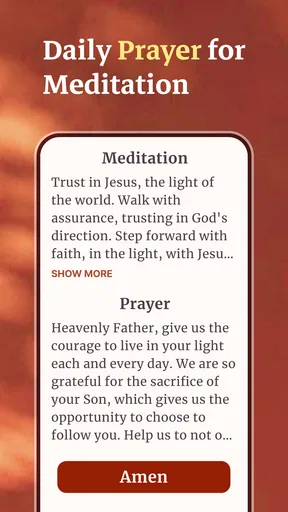
When I open a Bible app for the first time, I want to get to a passage without wrestling with menus, and I want the text to be comfortable to read for more than a minute. Holy Bible-Large Print is aimed at that straightforward kind of use: it is a free reading and reference app from Bíblia Offline, with large-print reading, audio, offline study, and a daily verse among its central ideas. Its focus is practical rather than flashy, which makes it a sensible starting point for someone who wants Scripture close at hand on a phone.
What to expect from a large-print Bible app
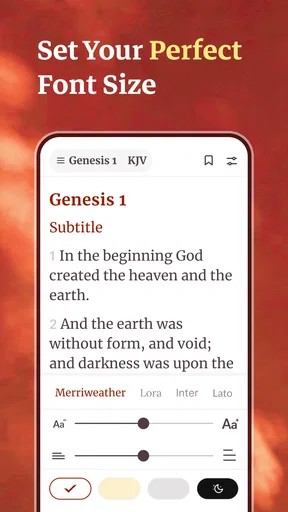
The most useful thing to understand before installing is the app’s emphasis: it is built around reading, listening, and returning to the Bible in everyday moments. Large print can make a meaningful difference on a small screen, particularly if you usually find phone text tiring or prefer not to keep pinching and zooming. It is also useful when you read in short sessions, because you can settle into a passage instead of constantly adjusting the display.
Offline access is another part of the appeal. If you like reading during a commute, in a place with unreliable reception, or somewhere you deliberately keep your phone disconnected, an offline Bible can be more dependable than a website. I would still make a point of opening the app and checking that the material I plan to use is available before relying on it away from a connection. That small check avoids the common disappointment of discovering an offline limitation at the moment you need the text.
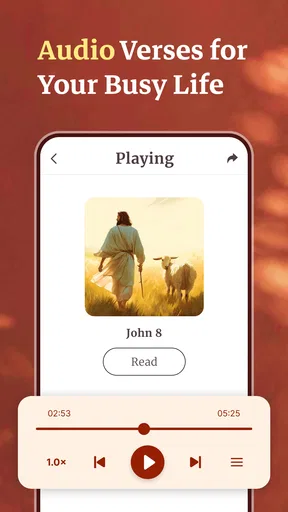
Audio makes the app relevant even when reading is inconvenient. You might listen while getting ready in the morning or during a quiet walk, then switch to reading when a particular verse catches your attention. That said, listening is not automatically the best fit for every situation: it needs a suitable environment, and people who want to compare several passages closely may find it easier to work with text.
The app has a 4.9 average from around 13,000 ratings, and it has passed 100,000 installs. Those figures suggest that many people have found a use for it, but I would treat them as context rather than a promise that its reading style will suit everyone. The right test is personal: can you find a passage easily, read it comfortably, and make the app part of a routine without it becoming a chore?
Who is likely to appreciate it
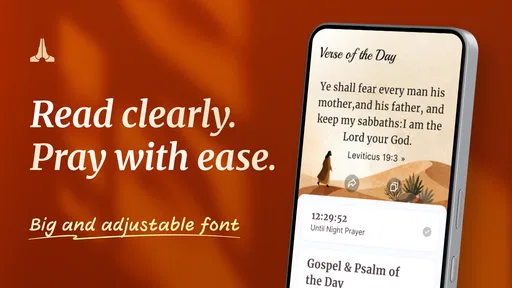
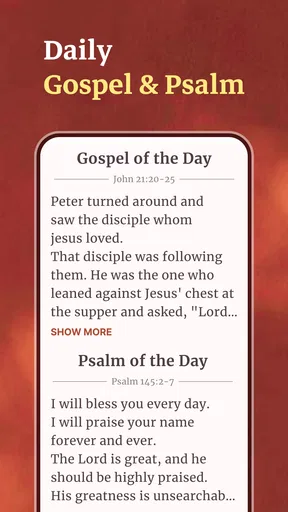
I can see it working well for readers who want a dedicated Bible on their phone rather than a general e-book reader, especially people who value large text or want the option of listening. It may also suit someone returning to regular reading who benefits from a simple daily prompt. A daily verse can serve as a gentle entry point, but I would use it as a starting place for a longer passage rather than treating one isolated line as the whole of a chapter’s meaning.
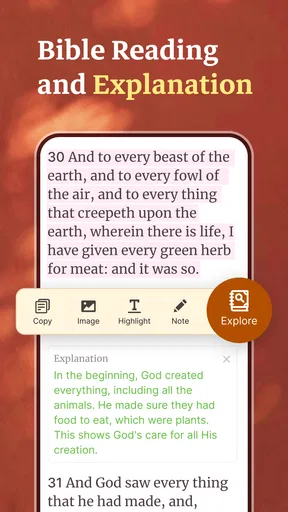
If your main goal is scholarly comparison across translations, detailed study tools, or a customized reading library, a more specialized Bible reference app may be a better match. This app’s stated strengths are accessibility and everyday use, not an exhaustive research workspace. Likewise, if you want a general-purpose reading app for many kinds of books, a Bible-specific tool may feel narrower than you need.
Worth Reading Before You Choose

Flipboard Shows What News Apps Must Do Beyond the Feed

Switching to Android Auto Means Rethinking Your Driving Routine

Google Calendar Makes a Crowded Week Easier to Manage

Ludo King Makes the Most of the Minutes Between Plans

Baby Panda World Brings Quick Play to Modern Phones, but Its Game Library Feels Busy

ESPN’s Live Game View Makes Following Close Games Easier
Make the first setup calm and useful
After installing, I recommend taking a moment to adjust your expectations and explore the reading experience before setting a demanding routine. Start by opening a familiar passage or a short section you already know. That gives you a fair way to judge the text size, page readability, and how comfortably you can move through the material. A familiar passage is more useful for this first check than beginning with a long reading plan you might abandon if the layout feels awkward.
Because the app is described as supporting offline study, it is worth checking your preferred reading material while you have a connection. Try opening a passage, leaving it, and returning to it. Then, if offline use matters to you, test access with your device disconnected. This is a practical habit, not a complicated setup: it helps you know what works before a commute or a trip, and it separates a genuine offline workflow from simply assuming every resource is already available.
Audio is best tried in a quiet moment rather than while you are rushing out the door. Listen to a short section and notice whether the pace and format help you follow along. If you find that your attention wanders, use the audio as a companion to the text: read first, listen afterward, or keep the Bible open so you can reconnect with the passage. The point is not to force one mode but to discover which one fits the moment.
The app is free, is rated for Everyone, and is listed as version 1.8, with Android 7.0 as the minimum operating-system requirement. It was released on June 10, 2026. Those details make it easy to judge basic compatibility and suitability for a shared household device, while the free price removes a purchase decision from the first try. The developer is Bíblia Offline, a name that reflects the app’s practical emphasis on access without a constant connection.
Your first meaningful reading session
For a reassuring first success, choose a short passage and read it once without trying to build a whole study system around it. Then pick one sentence that stays with you and reread the surrounding lines. This simple second pass is more useful than treating the daily verse as a standalone quote: context can change what a line seems to say, and returning to nearby verses helps keep the reading grounded.
A realistic example is a busy morning when you have only a few quiet minutes. You can open the app, read a brief portion in large type, and carry one thought into the day. If reading is not convenient, audio gives you another way to engage. Later, when you have time, revisit the text rather than relying on memory alone. That sequence turns a small daily prompt into a more considered habit without making the app feel like another task list.
For a first offline test, use a passage you already know rather than something you urgently need to find. Open it while connected, then try again without a connection. If it remains accessible, you have confirmed a practical use case for travel or patchy reception. If the experience does not match your expectations, you can investigate the app’s available offline options before depending on it. This is one of the most useful early checks because “offline” matters most precisely when troubleshooting is inconvenient.
Common points of confusion
Large print is helpful, but it does not automatically mean every part of the interface will feel equally spacious. Pay attention to the reading view itself and decide whether it works for your eyes and device. If text feels comfortable but you still have to work to navigate, that distinction matters: the app may be a good reading choice even if its broader controls are not your ideal way to browse.
It is also easy to confuse a daily verse with a complete daily reading. A single verse can offer a manageable prompt, but it may leave out the passage’s setting or the argument around it. I would use it to choose what to read next, then open the surrounding section. That small habit is especially valuable when a line sounds unusually definitive or seems to fit a personal question too neatly.
Audio and offline access solve different problems. Audio helps when your eyes or hands are occupied; offline availability helps when connectivity is missing. Neither guarantees the other, so test both separately. If you are planning to listen without a connection, check that your intended audio material is accessible in that situation rather than assuming that text availability proves audio will work too.
Another reasonable question is whether this can replace a printed Bible. For many short sessions, a phone is convenient and large text can be comfortable. A printed edition may still be preferable for long study, annotation, or a screen-free routine. I would treat the app as a portable companion rather than an obligation to abandon a format that already works for you.
Build a routine that fits your day
Once the first reading feels comfortable, connect the app to a moment that already exists in your routine: a quiet pause before breakfast, a break between errands, or a few minutes before bed. Keeping the goal modest is a useful trade-off. A short passage you actually return to is more valuable than an ambitious schedule that makes you feel behind after a missed day.
You can also alternate how you use the app. Read when you want to examine the wording closely; listen when a screen is inconvenient; use the daily verse as a doorway into its surrounding passage. That approach takes advantage of the app’s different modes without assuming that one feature should handle every need. It is particularly helpful for people whose available time and attention change from day to day.
If you are sharing a device, the Everyone age rating may make the app suitable for a broad household audience, but I would still guide a new reader toward a passage that makes sense for their age and interests. A simple reading tool can make access easier; it does not replace the conversation that helps someone understand what they are reading.
Where it fits among alternatives
Compared with reading the Bible in a browser, a dedicated app can be more convenient for returning to Scripture and making use of offline access. Compared with a general e-book reader, its purpose is more focused on Bible reading and related daily use. The trade-off is that a specialized app may not offer the flexibility of a broad digital library, while a browser can be easier when you need to consult a page without installing anything.
Against more feature-heavy Bible study apps, Holy Bible-Large Print makes the stronger case for approachable reading, comfortable text, audio, and offline use. If you are the sort of reader who wants extensive comparison and research features, choose a tool designed around that work. If you mainly want an accessible Bible on your phone and a gentle way to return to it, a simpler focus can be an advantage rather than a shortcoming.
A practical choice for particular reading habits
One useful way to decide is to think about what usually interrupts your reading. If small text puts you off, the large-print focus addresses a real everyday barrier. If it is lack of time, a short passage or listening session may be easier to fit in than sitting down with a print edition. But if your reading depends on marking pages, comparing versions side by side, or taking extensive notes, I would keep a study-focused resource or paper Bible in the mix rather than expecting this app to do every job.
For a new user, I would keep the first week deliberately simple: choose one familiar time of day, read a short section, and note whether text or audio helps you stay attentive. That little experiment tells you more than trying to explore every possible use at once. It also makes it easier to spot the specific friction—screen comfort, navigation, or the listening format—that would determine whether the app becomes a habit.
My recommendation is to install it, test a familiar passage, and confirm offline access and audio in the situations where you expect to use them. Holy Bible-Large Print is at its best when it removes small barriers to reading: text that is easier to see, a passage available at a quiet moment, or listening when looking at a screen is not practical. I would skip it if you need an advanced research environment or prefer to keep reading entirely on paper. For a first-time user who wants a calm, practical route from opening the app to completing a real reading session, it is a promising place to begin.
Pros
- Large text makes reading more comfortable for users who prefer bigger print.
- Simple layout keeps the focus on Bible passages.
- Useful for reading Scripture during quiet moments or study sessions.
- Search tools can help locate passages without browsing page by page.
- Convenient access to Bible reading on a phone or tablet.
Cons
- Large text may require frequent scrolling on smaller screens.
- Reading features can vary depending on the app version and device.
- A phone screen may be less comfortable than a printed Bible for long sessions.
- Some users may prefer a specific translation that the app does not offer.
- Notifications or ads
- if present
- may interrupt focused reading.
FAQs for Holy Bible-Large Print
What is Holy Bible-Large Print?
Holy Bible-Large Print is a Bible-reading app designed to make Scripture easier to read on a mobile device. Its large-text presentation may be especially useful for readers who find standard phone-sized text uncomfortable. Before downloading, check the store listing for the specific Bible translation, available books, and any reading tools included, since features and content can vary by app version and platform.
Can I use Holy Bible-Large Print without an internet connection?
Offline access depends on how the app delivers its Bible text and whether the content is stored on your device. Some Bible apps allow downloaded passages to be read without a connection, while others may need internet access for some or all content. Review the app description and test a passage in airplane mode after installation if offline reading is important to you.
Which Bible translation does the app include?
The translation available in Holy Bible-Large Print is an important detail to verify before you begin, particularly if you prefer a specific wording or want to follow along with a church, study group, or reading plan. Check the app’s store page and its settings for the translation name. Also note whether the app offers more than one translation or requires additional downloads.
Is Holy Bible-Large Print free, and does it include ads or in-app purchases?
The price and monetization model can differ between the Android and iOS versions and may change over time. Check the relevant app-store listing for whether Holy Bible-Large Print is free to install, whether it displays advertisements, and whether optional purchases or subscriptions are offered. If uninterrupted reading matters to you, review these details before downloading and explore the app’s settings for available options.
Is Holy Bible-Large Print suitable for readers with low vision?
Its large-print focus may make Bible passages more comfortable to read than small text in a typical mobile app, but it should not be treated as a substitute for dedicated accessibility tools. Try the text-size controls, screen orientation, and your device’s built-in display and accessibility settings. Comfort varies by person, so check the screenshots and features listed for your device before relying on the app.


